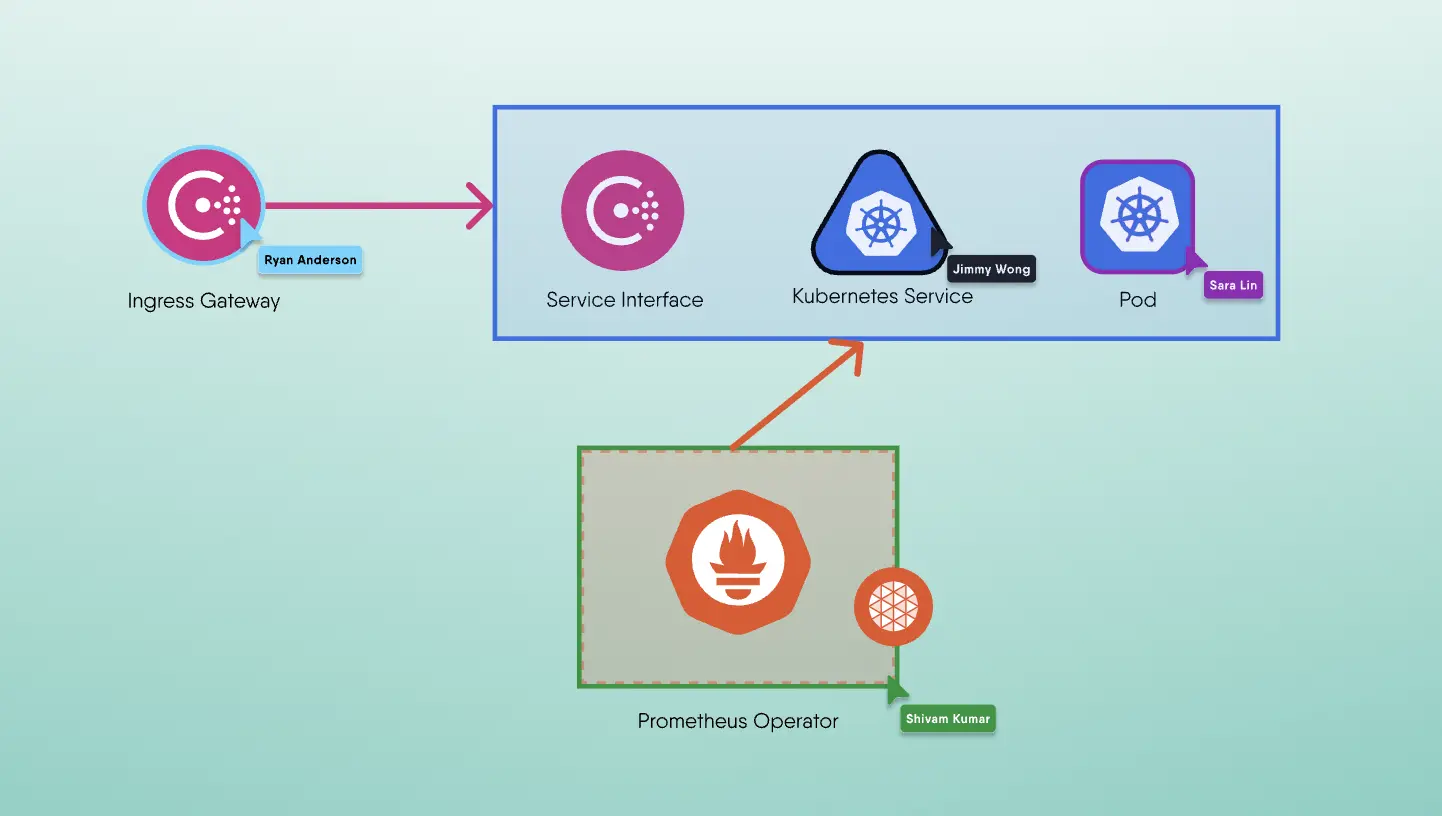
If you've ever used Miro, you know the appeal of a collaborative visual workspace. Sticky notes, diagrams, infinite canvases—it's a designer's playground. But what happens when engineers need more than just pretty diagrams? What happens when those boxes and arrows need to actually do something?
That's where Kanvas comes in.
Kanvas is what you get when you take the collaborative visual thinking of Miro and infuse it with the power of infrastructure-as-code, Kubernetes orchestration, and GitOps workflows. It's not just a whiteboard—it's a complete engineering platform for cloud-native infrastructure.
The Miro Experience (And Its Limits)
Let's be fair: Miro is excellent at what it does. Teams use it to:
- Brainstorm ideas with virtual sticky notes
- Map out user journeys and customer experiences
- Create wireframes and mockups
- Run design thinking workshops
- Collaborate asynchronously across time zones
For product designers, UX researchers, and agile teams, Miro is invaluable. The problem emerges when you try to move from design to deployment.
Picture this: Your team has just spent two hours mapping out your microservices architecture in Miro. Beautiful diagram. Everyone's aligned. Great meeting.
Now what?
Someone has to translate that diagram into YAML. Someone has to configure the ingress controllers. Someone has to set up the service mesh. Someone has to ensure the production deployment actually matches what's on the whiteboard.
The diagram and reality immediately diverge.
The Infrastructure Gap
This gap between design and reality is what we call the infrastructure gap. Traditional diagramming tools create a one-way street: you design, then you implement separately. There's no connection between the visual representation and the actual infrastructure.
This leads to:
- Drift: Your diagrams become outdated the moment infrastructure changes
- Manual Translation: Engineers spend hours converting boxes and arrows into YAML manifests
- No Single Source of Truth: Is the diagram right? Is the code right? Who knows?
- Limited Collaboration: DevOps engineers can't "play" in the same visual space as the rest of the team because the tool doesn't speak their language
Enter Kanvas: Where Design Meets Deployment
Kanvas is fundamentally different. It's built on the principle of Infrastructure as Design—the idea that your visual representation and your actual infrastructure should be the same thing.
When you drag a Kubernetes Deployment onto the Kanvas canvas, you're not drawing a picture of a deployment. You're creating an actual Kubernetes deployment manifest. When you connect two services, you're not sketching a relationship—you're defining network policies and service meshes.
What Makes Kanvas an Engineer's Tool
1. Live Infrastructure Integration
Kanvas operates in two modes:
- Designer Mode: Create and design infrastructure patterns, applications, and deployments
- Operator Mode: Visualize and manage your live, running infrastructure in real-time
In Operator mode, Kanvas connects directly to your Kubernetes clusters. You can see what's actually running, what's healthy, what's failing—all visually. No more kubectl get pods in 47 terminal windows.
2. Import Existing Infrastructure
Already have Kubernetes manifests? Helm charts? Docker Compose files? Kustomize configurations?
Import them directly into Kanvas. The platform automatically converts them into visual components on the canvas, giving you instant visual insight into what you've already built. This is crucial for teams inheriting complex infrastructure or working with legacy systems.
3. GitOps-Native Workflow
Kanvas integrates seamlessly with GitOps workflows. Every change you make in the visual designer can be tracked, versioned, and managed through Git. Your infrastructure-as-design becomes infrastructure-as-code automatically.
This means:
- Full audit trail of who changed what and when
- Ability to roll back to previous infrastructure states
- Collaboration through pull requests and code reviews
- Consistency with your existing CI/CD pipelines
4. Multi-Cluster, Multi-Cloud Management
Built on top of Meshery, Kanvas supports managing infrastructure across:
- Multiple Kubernetes clusters
- Different cloud providers (AWS, GCP, Azure)
- Various service meshes (Istio, Linkerd, Consul, etc.)
- Hundreds of cloud-native technologies
You can design once and deploy everywhere, or visualize your entire distributed infrastructure in a single pane of glass.
5. Component Library with Real Infrastructure
Where Miro gives you shapes and connector lines, Kanvas gives you actual infrastructure components:
- Kubernetes Deployments, Services, ConfigMaps, and Secrets
- Istio VirtualServices and DestinationRules
- Prometheus monitoring configurations
- Database operators
- Custom Resource Definitions (CRDs)
- And thousands more from the ecosystem
Each component comes with its full configuration exposed, not just a pretty icon.
6. Collaboration That Scales
Like Miro, Kanvas supports multi-user collaboration. But unlike Miro, when multiple engineers are working together in Kanvas, they're not just moving sticky notes around—they're co-authoring production infrastructure.
Changes are collaborative, but also controlled. You can share designs, publish them to the Kanvas Catalog for others to clone, and standardize deployment patterns across your organization.
Real-World Use Cases
Scenario 1: Onboarding New Team Members
With Miro: "Here's a diagram of our infrastructure. Good luck figuring out what's actually deployed."
With Kanvas: Import your production Kubernetes manifests, visualize them on the canvas, and let new engineers explore the actual infrastructure visually. They can see relationships, configurations, and dependencies—all mapped to real resources.
Scenario 2: Designing a New Microservice
With Miro: Sketch the architecture, export a PNG, hand it off to DevOps to implement.
With Kanvas: Design the service architecture visually, configure the Kubernetes resources, define the service mesh policies, set up observability, and deploy—all from the same canvas.
Scenario 3: Troubleshooting Production Issues
With Miro: Diagrams are useless. Back to the terminal.
With Kanvas: Switch to Operator mode, see the live state of your infrastructure, identify failing components visually, and drill down into logs and metrics—without leaving the visual context.
Scenario 4: Standardizing Deployment Patterns
With Miro: Copy-paste diagrams and hope teams implement them correctly.
With Kanvas: Create a design pattern, publish it to the Catalog, and teams can clone and deploy it exactly as designed. Consistency guaranteed.
The Best of Both Worlds
Here's the thing: Kanvas doesn't replace the brainstorming aspect of Miro. You can still sketch, annotate, and collaborate visually. The difference is that when you're ready to move from idea to implementation, Kanvas goes with you.
You can start with high-level architecture diagrams and progressively add detail, configuration, and deployment logic—all in the same tool. The barrier between "design time" and "runtime" dissolves.
Who Should Use Kanvas?
Kanvas is ideal for:
- Platform Engineers building internal developer platforms
- DevOps and SRE Teams managing complex infrastructure
- Cloud Architects designing multi-cloud strategies
- Infrastructure Teams migrating to Kubernetes
- Anyone tired of YAML hell
If you're working with cloud-native infrastructure and you've wished for a better way to visualize, design, and operate it—Kanvas is your tool.
Beyond the Whiteboard: Infrastructure That Works
Miro is fantastic for what it does. But when you need to design infrastructure that actually runs, deploys, scales, and operates—you need more than a whiteboard.
You need Kanvas.
Infrastructure as Design. Not infrastructure as an afterthought.
Ready to see the difference? Try Kanvas today and experience what it's like to work with a tool built for engineers, by engineers.
Want to learn more? Check out the Kanvas Catalog for ready-to-use infrastructure patterns, or dive into the Meshery documentation to understand the powerful engine behind Kanvas.
 Team
Team